An open source project by Google (
google/artemis, Apache-2.0).
Why it matters
When Claude Code changes an Android app, someone still has to tap through a real device to see what the screen does after login, or write and maintain locator-based scripts that break when the layout changes.
ARTEMIS lets AI assistants and test suites use real phones like a human. You describe a task such as “Open Settings, find Battery and tell me current level”, and its agent observes the screen, acts on the device, and returns structured results. Its native Model Context Protocol (MCP) server lets Claude Code hand off that work and collect Logcat output and screenshots.
What you can do with it
Examples from the README:
- Cross-app automation — the live demo sets up driving routes and calculates total durations in Google Maps, then opens YouTube to play a Coldplay song.
- Prompt your phone in the IDE chat — the README’s example prompt for Codex, Antigravity, or Claude Code: “Build the latest changes into an APK, install it on the connected device, open the login screen with a test account, verify if there are any unexpected popups after login, and return screenshots of the final page.”
- Autonomous testing workflow — in the README’s Antigravity example, a test request becomes a step-by-step test plan, autonomous execution on a real device with performance profiling, and a final report with audit findings, metric tables, and raw datasets.
- Existing test frameworks — the Python SDK integrates into pytest or CI/CD pipelines with typed Pydantic results you can assert on.
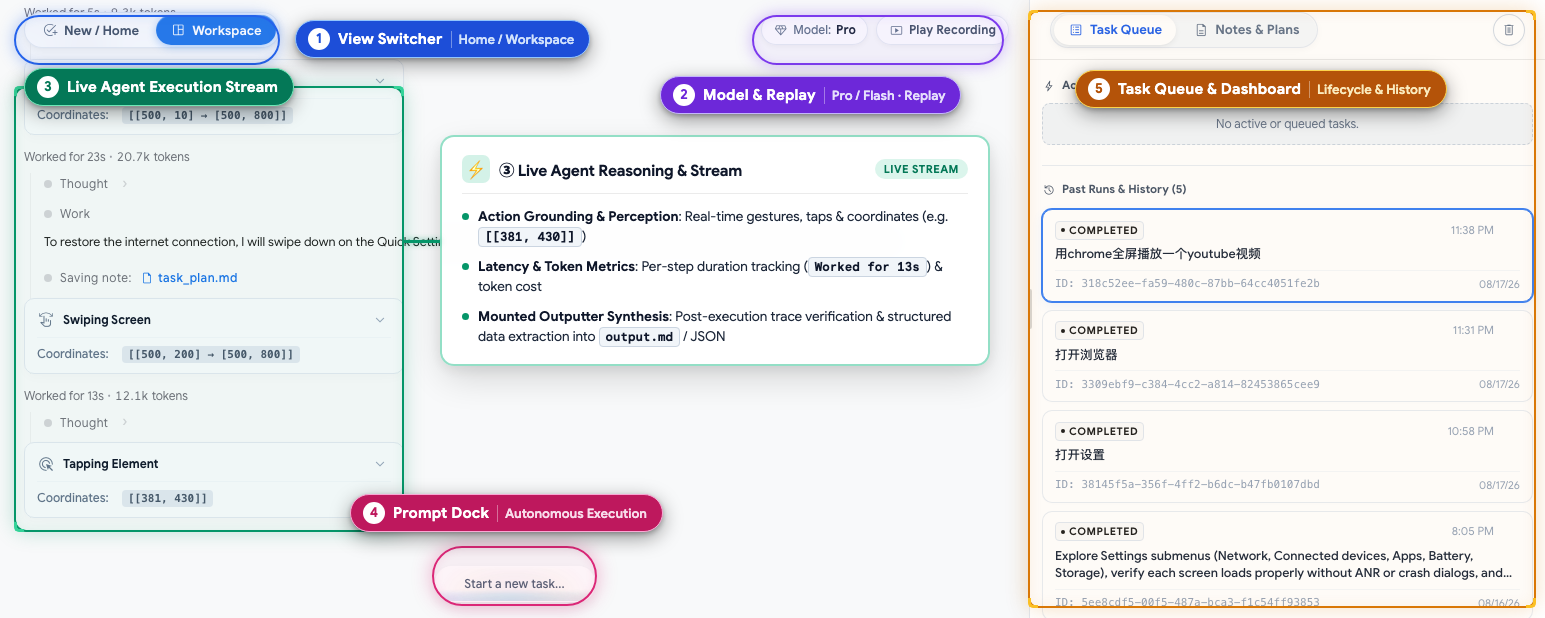
Image source: google/artemis (Apache-2.0)
Key features
-
Five MCP tools
mobile_run_tasklaunches the job as a detached background process, so the AI agent is not blocked and checks back on the task instead.Tool What it does mobile_run_taskLaunches an autonomous mobile automation task with the Flash or Pro profile mobile_manage_taskManages the task lifecycle ( status,stop,inject_instruction)mobile_get_device_stateReturns a screenshotor OCR+XMLhierarchyof the current screenmobile_inspect_traceInspects traces with visual action overlays and agent reasoning mobile_diagnoseEnvironment doctor that checks Python, LLM credentials, ADB, and devices, and returns an ordered fix list -
Flash and Pro execution profiles
Flash is a reactive loop with no task plan, no pre-execution safety net, no checkpoint verification or final report, and no ADB shell. Pro adds a Planner that maintains a Markdown task plan, an Operator whose every single action passes a pre-execution Safety Net (XML-first, pixel fallback), and a read-only Checker that verifies checkpoints and runs a final review against the original goal.
-
Multimodal targeting
ARTEMIS uses element indices when available, and combines accessibility hierarchies and OCR with visual models for custom Canvas, Compose, and Flutter interfaces.
-
Testing rules for AI assistants
mcp_server/rules.md, the Mobile Testing Mindset, covers active exploration before coding, Flash vs. Pro routing, latency and timing compensation, the “Dynamic-First, Coordinate-Fallback” locator pattern, and callingmobile_diagnosefirst whenever a tool errors. -
Multi-device execution
Per-device execution locks let distinct devices run in parallel. Omit
device_serialto let ARTEMIS auto-select an available ready device.
Using it with Claude Code
Run this from the repo directory, or accept the prompt that ./start.sh shows on first launch:
uv run artemis mcp --install claudeIt writes to these user-level files:
~/.claude.json— adds theartemisserver to Claude Code’s global MCP configclaude_desktop_config.json— adds the same server to Claude Desktop~/.claude/rules/artemis.md— installs the testing rules in exactly one location, since Claude Code loads both~/.claude/CLAUDE.mdand~/.claude/rules/*.md
--install all configures every supported AI IDE, so targeting claude keeps the change limited to Claude.
For Claude Code, ARTEMIS reports a finished background task with a native desktop notification and a JSONL audit log in notifications.jsonl. The reactive wakeup that resumes the conversation is Antigravity-only, so Claude Code checks results with mobile_manage_task(action="status").
How to use
Connect an Android device with USB Debugging enabled, or an emulator, then:
# 1. Clone repo & navigate to directory
git clone https://github.com/google/artemis.git && cd artemis

# 2. One-click launch (installs ADB, scrcpy, FFmpeg, and uv dependencies, then offers MCP setup)
./start.sh

# 3. Run a task directly from the CLI
uv run artemis run "Open Settings, find Battery and tell me current level" --profile flash
The launch opens http://localhost:8000 with a device connection wizard, live screen mirroring, prompt sandbox, and execution replays. Manage the server with uv run artemis status, uv run artemis restart, and uv run artemis stop.
Notes
- LLM provider key required —
.env.exampleasks you to configure at least one of Gemini, OpenAI, Anthropic, OpenRouter, or xAI. These calls are billed by the provider, separately from your Claude Code plan. - Android only — iOS devices and simulators are a roadmap item. If you need iOS and Android with the same tools, see Mobile MCP.
- Requirements — Python 3.12+, plus ADB, scrcpy, FFmpeg, and uv, which
./start.shdetects and installs. - Personal phones — the Accessibility Helper adds a collapsed “Artemis test helper is running” notification and an entry under Settings > Accessibility. Per the README, it listens only on the phone itself and sends nothing elsewhere. Set
ARTEMIS_HELPER_AUTO_INSTALL=falseon shared or personal phones, andARTEMIS_KEEP_DEVICE_AWAKE=falseif the screen should time out. - Benchmark claims — the README reports a 99%+ completion rate on Google Research’s AndroidWorld benchmark (20+ apps, 100+ multi-step tasks). This is the project’s own figure.
- Docs — MCP tools and notification channels are covered in the MCP Server README.